Showing posts with label Introduction to python. Show all posts

9/22/22

Arrays in Python

 Python Notes Unit 1, Part 3

UNIT – 1 (part 3)


Introduction to Python Part 1

                    Introduction to Python Part 2


Introduction to Python

History and its Features

Basic Syntax

Understanding Python variables

Numeric data types

Using string data type and string operations

Basic Operators

Understanding coding blocks.

Defining list and list slicing,

Other Data Types- Tuples. List, Python Dictionary, Arrays, Associative Arrays/Hashes


 ARRAY IN PYTHON

    1.   An array is a collection of common type of data structures having elements with same data type.

    2.   Array is mainly used to store collections of data.

    3.   Arrays are handled by the “array” module. If you can create array using array module, elements of the array must be of the same numeric type.

    4.   The Arrays are especially useful when you have to processed the data dynamically.

    5.   Python arrays are used when you need to use many variables which are of the same type.


Syntax for create an Array in Python –

                     You can declare an array in Python while initializing it using the following syntax.

                              arrayName = array.array(data Type, [array items])


In python, there are following operation can be performed on array –


BASIC ARRAY OPERATIONS                             

(a)     Adding/changing

(b)     Removing/deleting

(c)      Searching

(d)     Slicing

(e)      Looping


Associative Array –

    1.   Associate array are also called maps or symbol tables or dictionaries.

    2.   In an associative array, the values of the array are key-value pairs.

    3.   The key represents a lookup value or an index. The value is the value stored for that key.

    4.   Each key must be unique.

    5.   The Associative Array data structure is an abstract data structure.

    6.   There are several ways to implementing it, with the hash table being the most common.


Hash Table –

    1.   A hash table has two parts: An array and a hash function.

    2.   The hash function is a function that returns an integer given a key.

    3.   The hash function is used to determine where the value should be stored.

    4.   The name of the key is used to access its associated value.

    5.   This makes searching for values in a hash table very fast, irrespective of the number of items in the hash table.

  The hash table data structure stores elements in key-value pairs where

(a)         Key – unique integer that is used for indexing the values

(b)         Value – data that are associated with keys. 


Basic operators in Python   

Operator –

Operator is a symbols which tells the interpreter to do a specific operation such as arithmetic, comparison, logical and so on.

In Python, there are following types of Operators-

1.   Arithmetic Operator

2.   Relational Operator

3.   Bitwise Operator

4.   Assignment Operator

5.   Logical Operator 


Arithmetic Operator – 

An Arithmetic operator takes two operands as input, for perform a calculation and returns the result.

For Example- 

              a= 2+3   

Here 2 and 3 are the operands and + is the Arithmetic operator.

The result of the operation is stored in the variable a.


Relational Operator-

A Relational Operator is used to comparing two operands to decide a relation between them. Its returns a Boolean value based on the condition. 

For Example-

                   8>3 return true.

Here 8 and 3 are operands and > is operator.

Bitwise Operator-

A bitwise operator performs operation on the operand bit by bit. There          are mainly 4 types of bitwise operator is used –

1.   Bitwise AND (&)

2.   Bitwise OR (|)

3.   Bitwise XOR (^)

4.   Bitwise NOT (~)

Consider a = 2 (10)2 and b = 3 (11)2

Perform bitwise AND operation on the operands-

          a & b = 2 (10&11 = 10)2

Perform bitwise OR operation –

         a | b = 3 (10|11 = 11)2 

Perform bitwise XOR operation-

        a ^ b = 1 (10^11=01)2

   Perform bitwise NOT operation

      ~a = -3 ((00000010) = (11111101))2

Assignment Operator –

An Assignment operator is used to assign a value to a variable.

This is usually combined with other operators where the operation is performed on the operands and the result is assigned to the left side operands.

For Example- 

                a = 9

Here “=” is an assignment operator, and the result is stored in variable a.


Logical Operator-

A logical operator is used to make a decision based on one or more conditions. The logical operators used in Python are -

1.   and

2.   or

3.   not   

For example –

        a and b

        a or b

         not a


************************* THE END *************************


Introduction to Python Part 1

                    Introduction to Python Part 2


Unit 2 Notes will uploaded ASAP keep studying.


9/7/22

Python data types and string

Python Notes Unit 1, Part 2

UNIT – 1(part 2)


Introduction to Python Part 1

Introduction to Python Part 3

Introduction to Python

History and its Features

Basic Syntax

Understanding Python variables

Numeric data types

Using string data type and string operations

Basic Operators

Understanding coding blocks.

Defining list and list slicing,

Other Data Types- Tuples. List, Python Dictionary, Arrays, Associative Arrays/Hashes


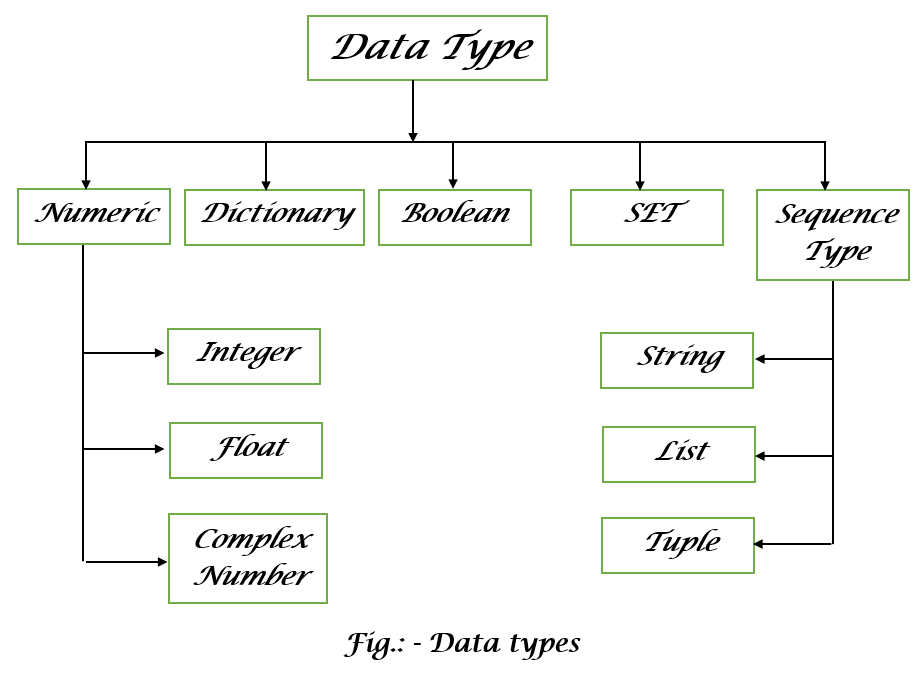
Data types: -

    1.   The type of variable present in our code is represented by Data Types.

    2.   A data type is the classification of data items.

    3.   Data type represents the kind of value that tell what operation can perform on particular code.

    4.   Various type of data types that define the storage method on each of them.


Numeric data type

In python, three types of numeric data types

1.   Integer

2.   Float

3.   Complex number

Mainly two types of numeric data types are used in code.

                    Integer or float.

 Numeric data type represents the data that has a numeric value. This numeric value can be integer, float and complex number. These values are defined as int, float and complex classes.


For example – int data type

                         a=5

  print (“the type of a”, type(a))

  Output – The type of a <class ‘int’ >


For example – float datatype

            a = 4.5

            print (“the type of b”, type(b))

Output – The type of b <class ‘float’ >


Dictionary data type –

    1.   Dictionary data type are working as hash table type.

    2.   In dictionary data type each key are stored and indicate different value at searching time.

Boolean data type: -

    1.   Boolean data type is also a type of one of the built-in data types.

    2.   This data type is representing one of the two values.

a.    Either TRUE

b.   Or FALSE

    3.   Boolean data type is also a logical data type than can have only the values.

    4.   True and False are also used as keywords.

    5.   The keyword True and False must an Upper Case first letter if we are using lowercase true return an error.

Example

               print(True)

               print(type(True))

               print(False)

               print(type(False))

Output

            True

            <class ‘bool’>

            False

            <class ‘bool’>


Set data type: -

    1.   A set data type is collection which is unordered, unchangeable and unindexed.

    2.   Set is defined by comma inside braces { }.

    3.   Items under the set are not ordered.

Example –

                   a = {5, 2, 3, 1, 4}

                   print (“a = “, a)

                   print(type(a))

Output -  

              a= {1, 2, 3, 4, 5}

              <class ‘set’>


Sequence type data type   -

1.   Sequence type data type is used to store data in containers.

2.   List, Tuple and String are the different types of containers in python programming language.


String: -

    1.   A string is generally considered as a data type and is often implemented as an array data structure of bytes that stores a sequence of elements, typically characters, using some character encoding.

    2.   Strings are sequences of character data.

    3.   The string type in Python is called str.

    4.      String can be considered as a special type of sequence, where all its elements are characters.


For example- string “Hello, World” is basically in sequence

 [‘H’,’E’,’L’,’L’,’O’,’’,, ‘ ’,’W’,’O’,’R’,’l’,’d’]


Declaration of strings: - 

                        >>> mystring = “This is not my first copy”

                         >>> print (mystring);

                         This is not my first copy            

List –

    1.   The list data type is a versatile data type.

    2.   In Python is list can simultaneously hold different types of data.

    3.   Formally list is an ordered sequence.

    4.   Defining a list in python is easy – just use the brackets syntax to indicate items in a list.

               List_of_ints= [1, 2, 3]

    5.   Items in a list do not have to all be the same type, either. They can be any python object.


Tuple –

    1.   The tuple data type is the same as List Datatype except that it is immutable, that means once we create any tuple, you cannot make any changes to that.

    2.   The tuple is a Read-only version of List, which means we cannot add, remove and replace any elements.

 The syntax for the Tuple is –

                                    Tuple=(Elements)


Example-          

                              Tuple= (10,20,30, “banana”)

                               Print(type(Tuple))


Output - <class ‘tuple’>


List Slicing          

    1.   List Slicing refers to accessing a specific portion of a subset of the list for some operation while the original list remains unaffected.

    2.   The slicing operator in python can take three parameters out of which two are optional depending on the requirement.


Syntax of list slicing:    

                              List_name [start:stop:steps]          

    3.   The start parameter is a mandatory parameter, whereas the stop and steps are both optional parameters.


    a.    The start represents the index from where the list slicing is supposed to begin. Its default value is 0, it begins from index 0.

    b.   The stop represents the last index up to which the list slicing will go on. Its default value is (length(list)-1) or the index of last element in the list.

    c.    The step represents the number of steps, i.e after every n number of steps, the start index is updated and list slicing is performed on that index, or in simple words, steps if defined, specifies the number of elements to jump over while counting from start to stop.


    This means we can do list slicing in three ways:

    1.   By passing just the start or stop parameter

    2.   By passing the start and stop parameter.

    3.   By passing the start, stop and steps parameters.


Next Part is coming soon..!! keep study and keep growing

Thank you..!!


Latest Update

New Web Site

Popular Posts